


OBD Fusion (Car Diagnostics)
4.6561.00 Reviews
App Specs
- Version
- 7.4.0
- Updated On
- License
- $5.99
- Downloads
- 100,000+
- Developer
- OCTech, LLC
- Categories
- Communication
- Platform
- Android, iOS
Screenshots
 Analysis by AppCompare
In a household where more than one person drives the same car, a warning light can turn a routine handoff into a guessing game: did it appear before the last trip, and has anyone checked it? I like the idea of having a phone-based way to read the car’s diagnostic information, provided everyone treats it as a tool for understanding a problem rather than a substitute for a mechanic. That is the practical role I see for OBD Fusion: it can help a driver gather useful clues before deciding what to do next.
One car, several drivers, clearer handoffs
Imagine one person in the household notices the check-engine light on the way home, while another is due to use the car the next morning. With a compatible OBD-II adapter connected, the next driver can check the available diagnostic trouble codes instead of relying only on a hurried description. That can make the conversation more specific: there is a code to look up and discuss, rather than a vague sense that something might be wrong.
The benefit is coordination, not automatic certainty. A code points toward a system or condition; it does not, by itself, establish the exact failed part or the safest repair. I would use the app to record what the car reports, share that information with whoever is arranging service, and avoid treating a cleared warning as proof that the underlying issue has gone away. This distinction matters when several people share responsibility for one vehicle.
Set expectations before connecting
OBD Fusion depends on a compatible OBD-II adapter, which is a separate purchase, so I would check adapter compatibility before choosing the app. The adapter is the bridge between the car and the phone; without it, downloading the software alone will not produce a live reading. Connection is generally straightforward in my experience, though Bluetooth or Wi-Fi pairing can still take a little patience if a device needs to be re-paired.
For a shared car, it helps to agree on a simple routine: who keeps the adapter, who is allowed to connect it, and where diagnostic notes should go. These are household choices rather than app controls. I would also make clear that changing a dashboard or clearing a code is not the same thing as authorizing a repair. Keeping that boundary avoids a well-meaning driver making a change without the person responsible for the vehicle knowing about it.
The app is sold for $5.99, and in-app purchases are listed from $14.99 to $74.99 per item. I would weigh those costs alongside the separate adapter purchase and decide whether I actually need enhanced diagnostic options before spending more. If all I want is an occasional basic code check, I would start by understanding what the standard app and adapter can do for my car rather than assuming every paid option is necessary.
Who should have access, and what should they trust?
The age rating is Everyone, but the practical question in a family is less about age labels and more about who understands what the readings mean. I would be comfortable letting an older teen help observe a dashboard while an adult explains the figures, but I would not expect a younger or inexperienced driver to diagnose a fault alone. The app can make information visible; interpreting it responsibly still takes judgement.
Worth Reading Before You Choose

EA SPORTS FC Mobile 26 Is a Bigger Football Game, but It Takes Time

Flipboard Shows What News Apps Must Do Beyond the Feed

Switching to Android Auto Means Rethinking Your Driving Routine

Google Calendar Makes a Crowded Week Easier to Manage

Ludo King Makes the Most of the Minutes Between Plans

Baby Panda World Brings Quick Play to Modern Phones, but Its Game Library Feels Busy
OBD Fusion is a communication app from OCTech, LLC, but in daily use its communication value is mainly between the driver and the car’s diagnostic system, then between household members who discuss what they found. It is not a household organizer, and I would not choose it to coordinate calendars, driver schedules, or family messages. For those needs, ordinary messaging or a shared calendar is a better fit; this app is useful when the conversation needs actual vehicle data.
Compared with a basic code-reader app or a handheld scanner, its appeal is the ability to view live readings and arrange selected information in custom dashboards, rather than only checking a code when a warning appears. That flexibility is helpful if one driver cares about a particular value and another wants a different view. The trade-off is that a phone, adapter, connection, and a little learning are involved. Someone who wants a quick, occasional code lookup with no interest in live data may prefer a simpler reader; a workshop-grade diagnostic workflow is a different need altogether.
OBD Fusion has a 4.7 average from around 2.9 thousand ratings, with over 100 thousand installs. Those figures suggest that plenty of drivers have found a use for it, but they do not tell me whether it supports every vehicle-specific feature I might want. Before relying on it for a particular car or advanced diagnostic task, I would check that the vehicle and adapter work with the readings I plan to use.
The app is rated for Everyone and runs on Android 6.0 or later; its current version is 6.14.0. It first appeared on June 7, 2012, and has 542 written reviews. I see those details as context, not a reason to assume every screen will feel familiar or every vehicle will expose the same information. A newer phone and a suitable adapter still need to work together reliably, and a car’s available data can shape what is useful in practice.
Have you ever wished you could peek under the hood of your car without getting your hands greasy? Well, folks, let me introduce you to OBD Fusion, a nifty app that turns your smartphone into a powerful diagnostic tool. With a simple connection to your vehicle's OBD-II port, this app claims to reveal everything from engine performance to fuel economy, all while saving you a trip to the mechanic. But does it really deliver? Let's dive in and find out.
Features That Stand Out
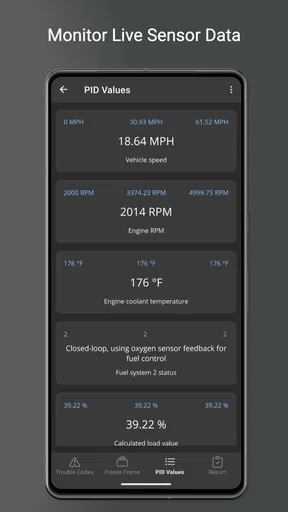
First off, OBD Fusion is compatible with both Android and iOS, which is a huge plus for those of us who switch between platforms like fashion trends. The app connects via Bluetooth or Wi-Fi to a compatible OBD-II adapter, which you’ll need to purchase separately. Once set up, the app provides real-time data on a variety of engine parameters. It’s like having a mini auto-shop right in your pocket!
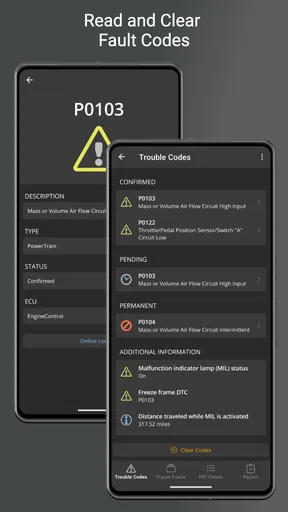
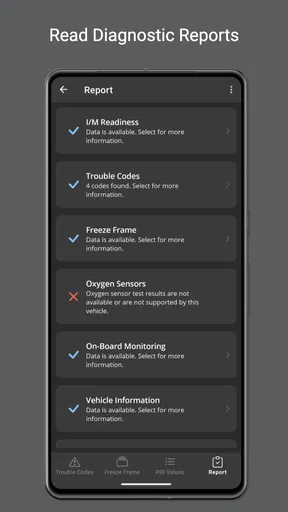
Now, what really caught my attention was the app’s ability to read and clear diagnostic trouble codes. You know those pesky warning lights that pop up on your dashboard? With OBD Fusion, you can identify the exact issue that triggered those lights, potentially saving you from unnecessary repairs. Plus, you can clear the codes yourself, although I’d recommend consulting a professional before doing so.
Customization and User Interface
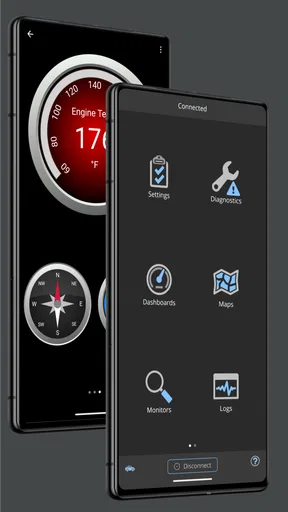
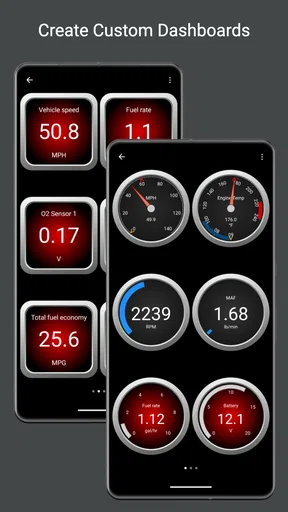
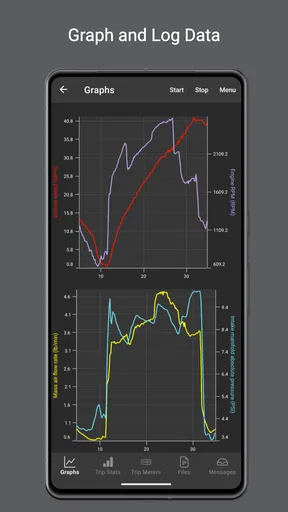
This app allows you to customize your dashboard with different gauges, graphs, and charts to display the data that matters most to you. Personally, I loved fiddling with the settings to create a dashboard that felt more like a cockpit. The interface is pretty intuitive, although it might take a bit of time to get used to all the features if you’re a first-time user.
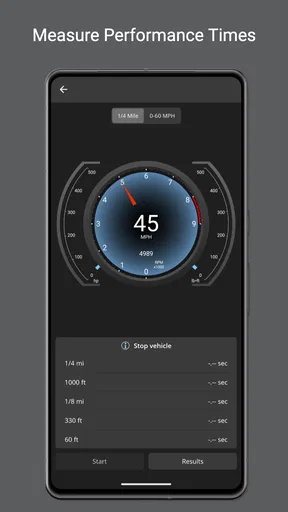
One thing I appreciated was the app’s attention to detail. You can even monitor fuel economy, track performance stats, and log data for future reference. For car enthusiasts and data nerds, this is a goldmine of information just waiting to be explored.
Performance and Ease of Use
Now, onto the performance. I tested the app using a basic Bluetooth OBD-II adapter, and the connection was smooth for the most part. There were a few instances where the app lagged a bit or lost connection, but these were rare and easily resolved by restarting the app or re-pairing the device.
The real-time data was accurate and provided insights that I didn’t even know I needed. For someone who’s not exactly a car expert, the app made complex data feel accessible. However, if you’re looking for a super in-depth analysis, you might need some prior knowledge or be willing to do a bit of research.
Is It Worth the Download?
So, should you download OBD Fusion? If you're someone who likes to stay informed about your car's health or just wants a cool gadget to play with, I'd say go for it. The app offers a lot of value, especially for those who want to avoid unnecessary trips to the mechanic. Plus, with regular updates and a supportive community, it’s clear that the developers are committed to improving the app.
That said, remember that you’ll need to invest in a compatible OBD-II adapter, which can range in price. But once you’ve got everything set up, you’ll likely find that the app pays for itself over time by helping you catch issues early and maintain your car’s performance.
In conclusion, OBD Fusion is a fantastic tool for anyone interested in car diagnostics. It’s user-friendly, packed with features, and offers insights that can save you time and money. Whether you’re a casual driver or a car aficionado, this app is definitely worth a look. Happy diagnosing!
Make the readings useful, not distracting
One practical way to get more from the customizable dashboard is to begin with a small set of readings that answer a real question. A screen crowded with gauges can look impressive, but it is harder to interpret at a glance and may encourage a driver to watch the phone instead of the road. I would arrange the dashboard while parked, then leave it alone during a trip. The point is to make a later check easier, not to turn driving into a live data session.
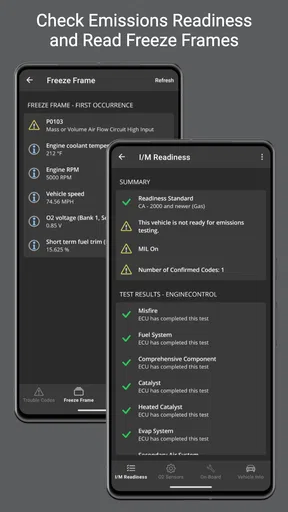
Logging is most useful when it has a purpose. If a symptom happens intermittently, a saved record may give you something concrete to compare or discuss with a repair professional. I would note the circumstances around the observation as well, such as whether it happened during a short drive or after the car had been running for a while. A graph or log without context can be easy to misread, so a little written note can make the data more useful.
When a warning appears: a calm workflow
If a dashboard warning comes on, I would first pay attention to the car itself and follow the vehicle’s manual or professional advice about whether it is safe to continue driving. The app is not a substitute for that decision. Once parked somewhere safe, I could connect the adapter, read the code, and keep a note of what appeared before clearing anything. That sequence preserves useful context and discourages the tempting but unhelpful habit of clearing a warning just to make the display look normal.
This is also where the app can reduce unnecessary guesswork without promising a repair. A code can help a driver ask a better question at a garage, but it may not identify the root cause on its own. If a warning returns, the symptom continues, or the car behaves unusually, I would treat that as a reason to get qualified help rather than repeatedly resetting the code. The strongest use here is informed communication, not do-it-yourself certainty.
Where it fits among diagnostic options
Many drivers only want to know what a warning light means. For them, a handheld reader or a simpler phone-based code checker may be enough, especially if they do not care about custom gauges or saved readings. OBD Fusion makes more sense to me when I want the phone to serve as a flexible display for live vehicle information and when I expect to revisit that information over time. Its advantage is depth and presentation; its cost is the adapter, setup, and effort needed to interpret the results.
At the other end, a professional scan tool and a mechanic’s experience are better choices when a fault needs detailed diagnosis or a repair decision has safety or cost consequences. An app can help me arrive with clearer observations, but it does not turn a general-purpose phone and adapter into a workshop. If the goal is simply to maintain a family’s driving schedule, a shared calendar is still the more useful tool; if the goal is understanding what a car reports, this is the more relevant option.
Who will appreciate it, and who may not
I would recommend it to a curious owner who wants to learn what the car is reporting, a driver who likes arranging selected readings on a dashboard, or a household that wants a shared reference point when discussing a warning. It is especially useful for someone willing to spend a little time checking adapter compatibility, learning what a code can and cannot tell them, and keeping sensible notes rather than treating every reading as a verdict.
I would skip it if I wanted a completely effortless answer, had no interest in interpreting vehicle information, or expected the app alone to diagnose and fix a problem. It is also a poor fit for anyone who would use live gauges while driving in a way that distracts them. A basic reader is simpler for occasional code checks, while a mechanic is the right call for diagnosis beyond the driver’s confidence or skill.
A sensible household routine
For a shared vehicle, I would keep the process consistent: agree on who connects the adapter, check readings only while parked, save relevant observations, and tell the other drivers what was found. That avoids duplicate troubleshooting and gives the household a clearer account if the car needs attention. It also keeps the app in its proper lane: a source of vehicle information, not a system for managing people or assigning responsibilities.
My overall view is that OBD Fusion is a worthwhile choice when its extra visibility will actually be used. The separate adapter and learning curve are real considerations, and the readings need interpretation, but the combination of codes, live data, custom dashboards, and logging offers more than a one-off warning-light lookup. For a household that wants to understand its car and communicate more clearly about maintenance, I would consider it a helpful companion—so long as everyone remembers that useful data supports good judgement; it does not replace it.
Pros
- User-friendly interface for easy navigation.
- Accurate real-time diagnostic data.
- Customizable dashboard for personal preferences.
- Supports a wide range of vehicles.
- Affordable compared to professional tools.
Cons
- Requires a compatible OBD adapter.
- Limited features on some older car models.
- Data logging can drain battery quickly.
- Initial setup can be confusing.
- No free trial version available.
FAQs for OBD Fusion (Car Diagnostics)
What is OBD Fusion and how does it work?
OBD Fusion is a comprehensive car diagnostic app that connects to your vehicle’s OBD-II port via a Bluetooth or Wi-Fi adapter. It reads and clears diagnostic trouble codes (DTCs), provides real-time data on your car’s performance, and helps you monitor various vehicle parameters, enabling you to maintain your car efficiently.
Is OBD Fusion compatible with my vehicle?
OBD Fusion is compatible with most vehicles manufactured after 1996 that support the OBD-II standard. However, it’s important to check your vehicle’s specifications and ensure you have a compatible OBD-II adapter to connect the app to your car for accurate diagnostics.
What features does OBD Fusion offer?
OBD Fusion offers a range of features including real-time performance data, customizable dashboards, GPS tracking, fuel economy tracking, and the ability to read and clear diagnostic trouble codes (DTCs). It also supports various units of measurement and provides comprehensive reports on vehicle performance.
Do I need an internet connection to use OBD Fusion?
No, an internet connection is not required for basic diagnostics and real-time data monitoring. However, certain features like map integration for GPS tracking and accessing online databases for code definitions may require internet access. Ensure your device can connect to the OBD-II adapter wirelessly.
How user-friendly is OBD Fusion for beginners?
OBD Fusion is designed to be user-friendly with an intuitive interface that is accessible to both beginners and experienced users. It offers easy navigation, detailed explanations of diagnostic codes, and customizable dashboards, making it simple to monitor your car’s health and understand diagnostic information.


